On device
Files, Photos, and disc images
 AllPlayer
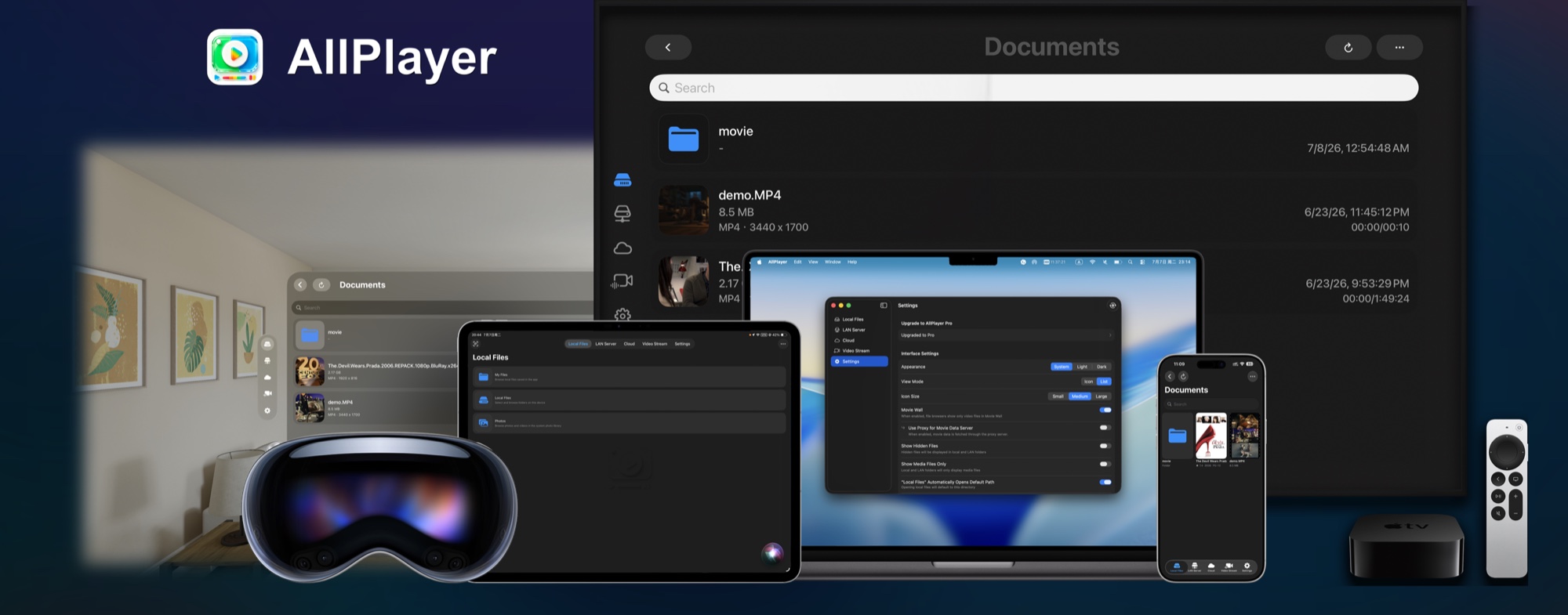
Native across Apple platforms
Bring local files, LAN and NAS libraries, media servers, cloud drives, and online streams into one personal media hub built for iPhone, iPad, Mac, Apple TV, Apple Vision Pro, and Apple Watch.
Local playback stays available after the trial. Pro is an optional one-time purchase.
Files, Photos, and disc images
NAS and media servers
Eleven storage providers
HLS, m3u8, and shared links
Everything in reach
AllPlayer follows the way personal media actually lives: across devices, folders, servers, cloud accounts, and stream lists.
Move naturally between local files, LAN servers, cloud storage, and video streams without rebuilding your library around one service.
Play common containers such as MP4, MOV, MKV, AVI, FLV, WMV, TS, M4V, RMVB, and RM. Browse Photos and open supported ISO, Blu-ray, and DVD Video content.
Browse folders and play directly from shared storage or a home media server.
Connect the services you already use, browse remote folders, and start playback without manually moving every file first.
Add HLS, m3u8, live, and web video links. Search and sort lists, import or export configurations, select available quality, cache an authorized stream locally, or watch up to four streams in five adjustable layouts.
Step into cinema environments, resize and curve the screen, adjust distance and height, switch 2D or stereo layouts, and keep subtitles and playback controls within reach.
New media center
The latest release keeps the direct file-browser workflow and adds a unified media center for the collection you return to every day.
Continue Watching, Recently Added, Favorites, Watch Later, History, and Downloads bring local, Photos, NAS, cloud, and stream content together.
Keep the familiar Local, LAN, Cloud, and Streams navigation when you want to move straight through folders. Switch modes at any time in Settings.
Connect from more places
Connection tools are now part of the product experience, not a collection of settings you have to troubleshoot alone.
Join your tailnet and reach compatible home media services remotely without running a separate Tailscale client on the playback device.
Discover sources, follow guided setup, and test both the current network and real server download speed when playback needs diagnosis.
Send supported media with AirPlay, or let AllPlayer appear as a DLNA / UPnP target. AirPlay receiving is also available on supported iPhone and Mac configurations.
One Apple ecosystem
iCloud can sync connections and viewing state. Handoff moves compatible playback between devices, Apple TV supports QR-assisted setup, and Apple Watch keeps browsing and playback controls on your wrist.
Keep progress, favorites, playback preferences, and connection configurations available across supported devices.
Use your phone to scan a QR code and securely transfer supported connection or sign-in details to the big screen.
Browse local, Photos, LAN, cloud, and stream sources from iPhone, then control playback from your wrist.
Simple access
Download free and choose when to begin the 7-day Pro trial. Pricing is shown by the App Store in your region.
AllPlayer
Built by an independent developer for people who keep, organize, and enjoy their own media.
Feature availability can vary by device, operating system, media source, and network conditions. Some advanced features require AllPlayer Pro.
为 Apple 全平台而生
把本机文件、局域网与 NAS、家庭媒体服务器、主流云盘和在线视频流,带进同一个个人媒体中心;覆盖 iPhone、iPad、Mac、Apple TV、Apple Vision Pro 和 Apple Watch。
体验结束后仍可继续本地基础播放,Pro 为可选的一次性购买。
文件、照片与光盘镜像
NAS 与家庭媒体服务器
连接 11 种云端存储
HLS、m3u8 与分享链接
所有内容,触手可及
AllPlayer 按照个人媒体真实存在的方式来组织内容:它们可能在不同设备、文件夹、服务器、云盘账号或视频流列表中。
在本机文件、局域网服务器、云端存储和在线视频流之间自然切换,不必为了一个播放器重新整理全部媒体。
播放 MP4、MOV、MKV、AVI、FLV、WMV、TS、M4V、RMVB、RM 等常见格式;浏览系统照片图库,并打开受支持的 ISO、Blu-ray 与 DVD Video 内容。
浏览共享文件夹,或从家庭媒体服务器直接开始播放。
连接正在使用的云端服务,浏览远程目录并开始播放,无需先手动搬运每一个文件。
添加 HLS、m3u8、直播流或网页视频链接;搜索与排序列表、导入导出配置、切换可用清晰度、缓存已获授权的视频流到本地,或用五种可调布局同时观看最多四路视频流。
进入不同影院环境,调整屏幕大小、曲率、距离与高度,在 2D 和立体布局之间切换,同时让字幕和播放控制始终触手可及。
全新媒体中心
最新版本保留直接浏览目录的使用方式,同时加入统一媒体中心,集中呈现你每天都会回看的内容。
继续观看、最近添加、收藏、稍后观看、历史与下载,把本机、照片、NAS、云端和视频流内容组织到一起。
想按文件夹查找时,继续使用本机、局域网、云端和视频流导航;你可以随时在设置中切换两种模式。
在更多地方连接
连接工具已经成为完整体验的一部分,让添加服务器、定位网络问题和跨屏观看都有清晰入口。
直接加入你的 tailnet,远程访问兼容的家庭媒体服务,无需在播放设备上另行运行 Tailscale 客户端。
发现媒体来源、跟随引导完成设置,并测试当前网络和服务器真实下载速度,快速定位播放卡顿原因。
使用 AirPlay 发送支持的媒体,或让 AllPlayer 成为 DLNA / UPnP 投屏目标;受支持的 iPhone 与 Mac 配置还可接收 AirPlay。
融入 Apple 生态
iCloud 可同步连接配置和观看状态,Handoff 可在兼容设备间接续播放;Apple TV 支持二维码辅助配置,Apple Watch 则把浏览与播放控制带到手腕。
在支持的设备间同步进度、收藏、播放偏好和连接配置,并接续兼容的播放任务。
用手机扫描二维码,把支持的连接信息或登录信息安全发送到大屏幕。
从 iPhone 浏览本机、照片、局域网、云端和视频流来源,并在手腕上控制播放。
简单清晰的使用方式
免费下载,并在需要时开始 7 天 Pro 体验;实际购买价格由你所在地区的 App Store 显示。
AllPlayer
由独立开发者打造,献给认真收藏、整理与享受自己媒体内容的人。
具体功能可能因设备、系统版本、媒体来源和网络条件而异;部分高级功能需要 AllPlayer Pro。